


Close Menu

    Subscribe to Updates

    Get the latest creative news from FooBar about art, design and business.

    What's Hot

    10 Things I Wish I Knew Before Starting Mewgenics

    10 February 2026

    Magic Not Planning Harry Potter Crossover Despite Parent Company Announcing Major Deal

    10 February 2026

    Pokémon Go Players Kept Swarming The Epstein Island Pokéstop, Forcing Devs To Remove It

    10 February 2026
    Facebook X (Twitter) YouTube Discord RSS
    Tuesday, February 10
    • Contact us
    • info@xtremeservers.com
    Facebook X (Twitter) YouTube Discord Instagram Pinterest RSS
    Xtreme Servers
    Xtreme Servers Blog Ad 1
    • Home
    • Game Servers
      • ARK: Survival Evolved
      • Counter Strike GO
      • Gary’s MOD
      • Minecraft
      • Rust
      • Team Fortress 2
    • Servers
      • VPS Hosting
    • Categories
      1. PlayStation
      2. PC
      3. Nintendo
      4. Xbox
      5. View All

      Monster Hunter Wilds: New content update and Arch-Tempered Arkveld arrive February 18 

      10 February 2026

      Fallout 76 Still Doesn’t Have Crossplay Seven Years Later, But Bethesda’s Not Ruling It Out

      9 February 2026

      Romeo is a Dead Man – Suda 51 and director Ren Yamazaki discuss controlled chaos of development

      9 February 2026

      State of Play returns this Thursday, February 12

      9 February 2026

      10 Things I Wish I Knew Before Starting Mewgenics

      10 February 2026

      Magic Not Planning Harry Potter Crossover Despite Parent Company Announcing Major Deal

      10 February 2026

      Pokémon Go Players Kept Swarming The Epstein Island Pokéstop, Forcing Devs To Remove It

      10 February 2026

      Monster Hunter Wilds Teases Expansion And Final Update As It Slowly Recovers On PC

      10 February 2026

      Today’s Nintendo Direct Was A Damning Display Of The State Of Switch 2

      5 February 2026

      The Elder Scrolls IV: Oblivion Remastered Is Coming To Switch 2…Eventually

      5 February 2026

      Everything We Saw At Today’s Nintendo Partner Direct

      5 February 2026

      Amazon Clears Out the Original Nintendo Switch With Joy-Con Controllers at a Record Low

      5 February 2026

      All Signs Point To A Resident Evil 5 Remake After New ESRB Listing

      10 February 2026

      Hearthstone Spotlight Announces the Next Expansion Coming, and More!

      9 February 2026

      Fallout 76 Still Doesn’t Have Crossplay Seven Years Later, But Bethesda’s Not Ruling It Out

      9 February 2026

      Relooted: Heist as Puzzle, Puzzle as Montage

      9 February 2026

      10 Things I Wish I Knew Before Starting Mewgenics

      10 February 2026

      Magic Not Planning Harry Potter Crossover Despite Parent Company Announcing Major Deal

      10 February 2026

      Pokémon Go Players Kept Swarming The Epstein Island Pokéstop, Forcing Devs To Remove It

      10 February 2026

      Monster Hunter Wilds Teases Expansion And Final Update As It Slowly Recovers On PC

      10 February 2026
    • Contact
    Xtreme Servers
    Home » Foamstars Open Beta Party launches this month – here’s everything you need to know
    Featured

    Foamstars Open Beta Party launches this month – here’s everything you need to know

    Sarah ConnorBy Sarah Connor14 September 2023No Comments6 Mins Read
    Facebook Twitter Pinterest Reddit LinkedIn Tumblr Email
    Share
    Facebook Twitter Pinterest Reddit Email

    Welcome to Bath Vegas – a sprawling metropolis of neon lights and retro Americana. It’s a party city fizzing with bubbly personalities and home to the world’s most spectacular foam party!

    That’s what you’ll get to experience in Foamstars – a new cooperative multiplayer shooter for PS5 and PS4 that puts two competitive teams of foam-flinging characters in fast-paced online battles. In September, you’ll be able to join the party yourselves in the Open Beta Party.

    It features two game modes, all the characters available at launch, and it’s free to play online for all PlayStation 5 players – even those without PlayStation Plus.

    Read on, and we’ll explain what’s in the beta, when and how to join, give you an overview of the game and reveal how to play like a pro!

    When is the Foamstars open beta and how do I join?

    The Foamstars Open Beta Party runs:

    • September 29, 9pm PDT – October 1, 11.59pm PDT
    • September 30, 2am BST – October 2, 7.59pm BST
    • September 30, 3am CET – October 2, 8.59am CET
    • September 30, 10am JST – October 2, 3.59pm JST

    During this period, you’ll be able to play without limits! What’s more, a bonus skin will be available in the full game for anyone who participates in the beta.

    To join, all you have to do is download the beta version of the game from PlayStation Store, and you’ll be able to take part in the competitive foamy fun online.

    Please note that you do not need an active PlayStation Plus subscription to join. The beta is open to any and all players with a PS5 and an online connection.

    Also, bear in mind that this is a network test, not a demo, so there is the possibility you may experience things like connectivity issues. Hopefully not, but hey – that’s why we need to test.

    What’s included in the Foamstars Open Beta Party?

    The beta includes two game modes: Smash the Star and Happy Bath Survival.

    Smash the Star

    This is a team deathmatch mode where, once enough takedowns have been made, a player on the opposing team becomes the Star Player. Your team has to take out this player in the allotted time to win the match… but watch out, because your opponents will be trying to do the same to your Star Player.
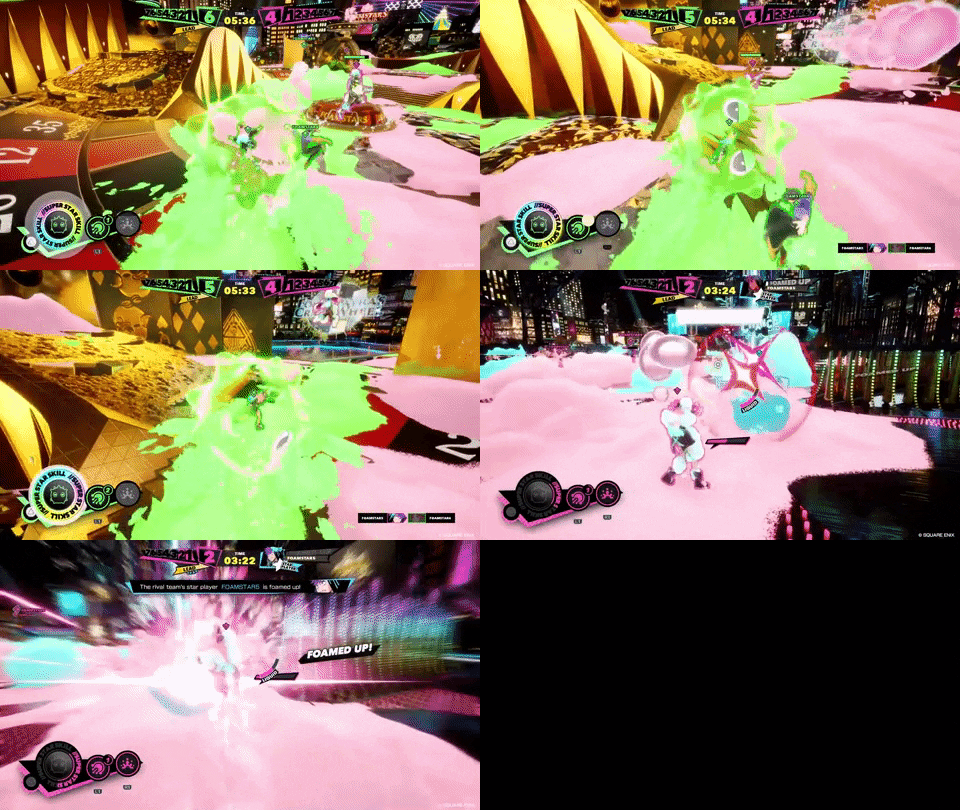
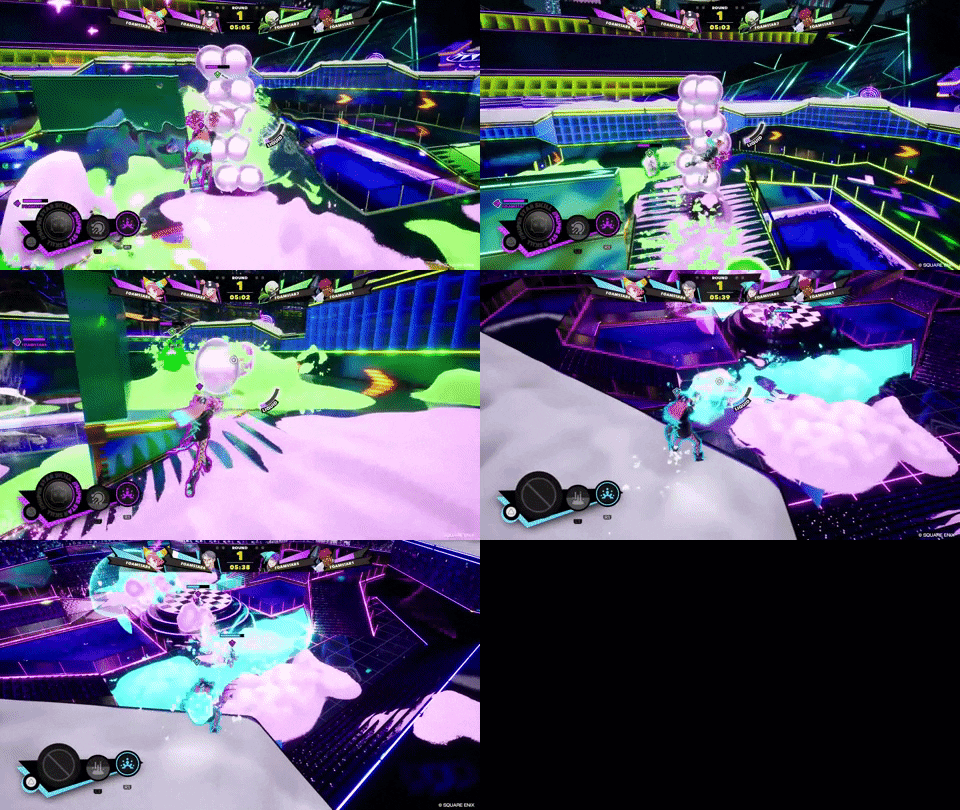
    Happy Bath Survival

    Happy Bath Survival is an intense close-quarters deathmatch where the arena is split into an outer and inner ring. Players on the inner ring try to take each other out, while players on the outer ring must use their foam-flinging weapons and abilities to help and hinder the combatants. It’s chaotic fun, where working together makes a real difference.
    What characters can you play in the beta?

    Eight characters are available to play in the open beta. Each of these Foamstars have unique weapons, skills and a Super Star Skill. You can mix and match characters between rounds or stick with one that suits your playstyle – it’s entirely up to you.

    Allow us to introduce you to the quirky cast:
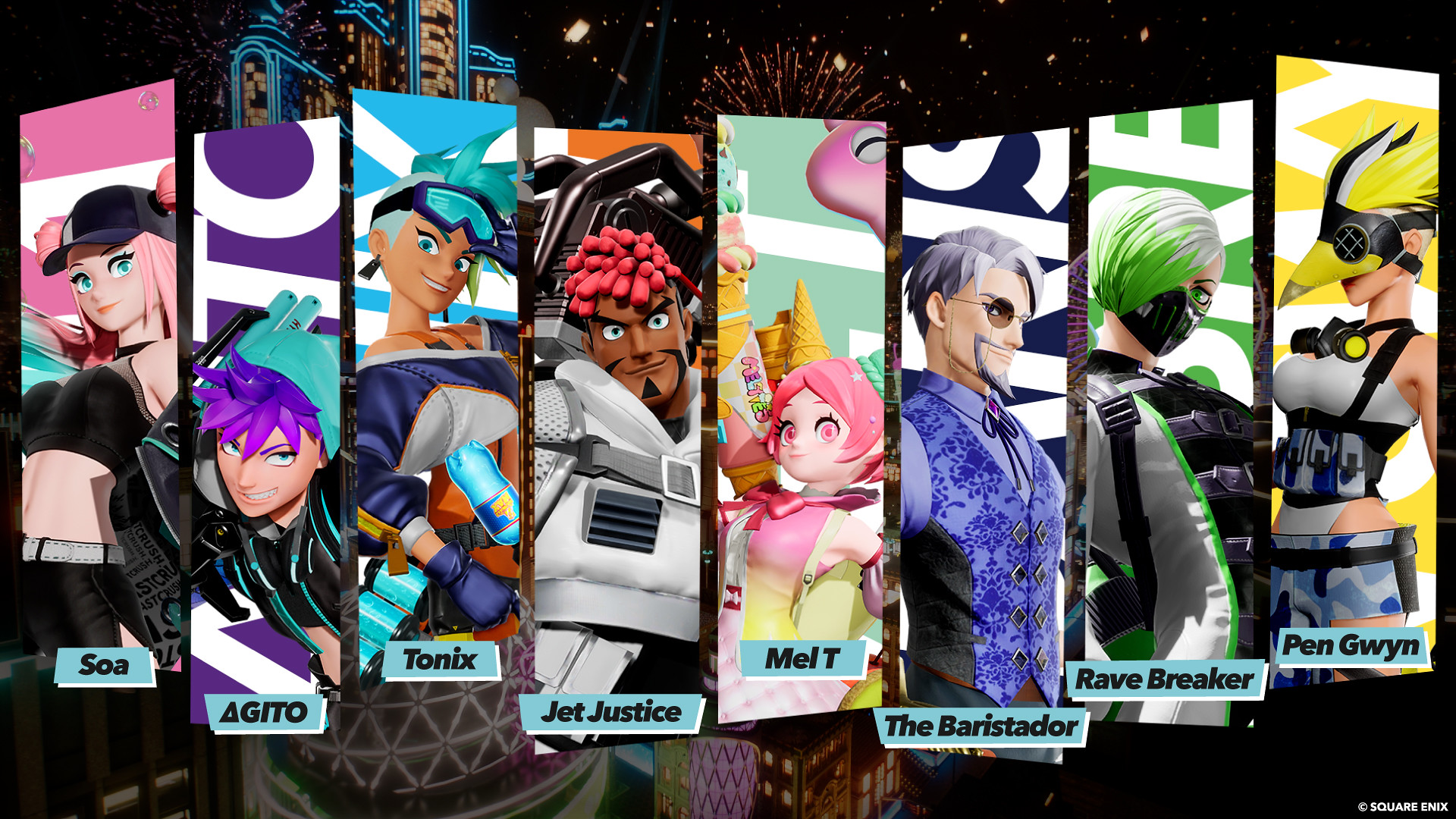
    • Soa – a stylish idol who has mastered the art of acrobatically controlling bubbles.
    • Jet Justice – a self-proclaimed hero who prowls the streets of Bath Vegas to keep them safe.
    • Tonix – a genius inventor who overflows with curiosity and is eager to test her inventions on the battlefield.
    • ΔGito – a pro-gamer who continues to dominate the world of e-sports and now wants to prove his skill in other fields.
    • Pen Gwyn – a penguin soldier who’s ready to chill anyone who stands in the way of her fight against global warming.
    • Mel T – the owner and face of an ice cream brand. She might appear innocent and cute but this CEO packs a real punch.
    • The Baristador – a refined gentleman full of mystery. Some might find it hard to believe he is the unassuming owner of café bar.
    • Rave Breaker – a clean freak who wants to eliminate all party animals and clean up the competition.

    How do you play Foamstars?

    The best way to learn how to play Foamstars is simply to do it – pick a character and experiment with the different skills and game modes to find what you like! However, to help you get started, we have some basic advice:

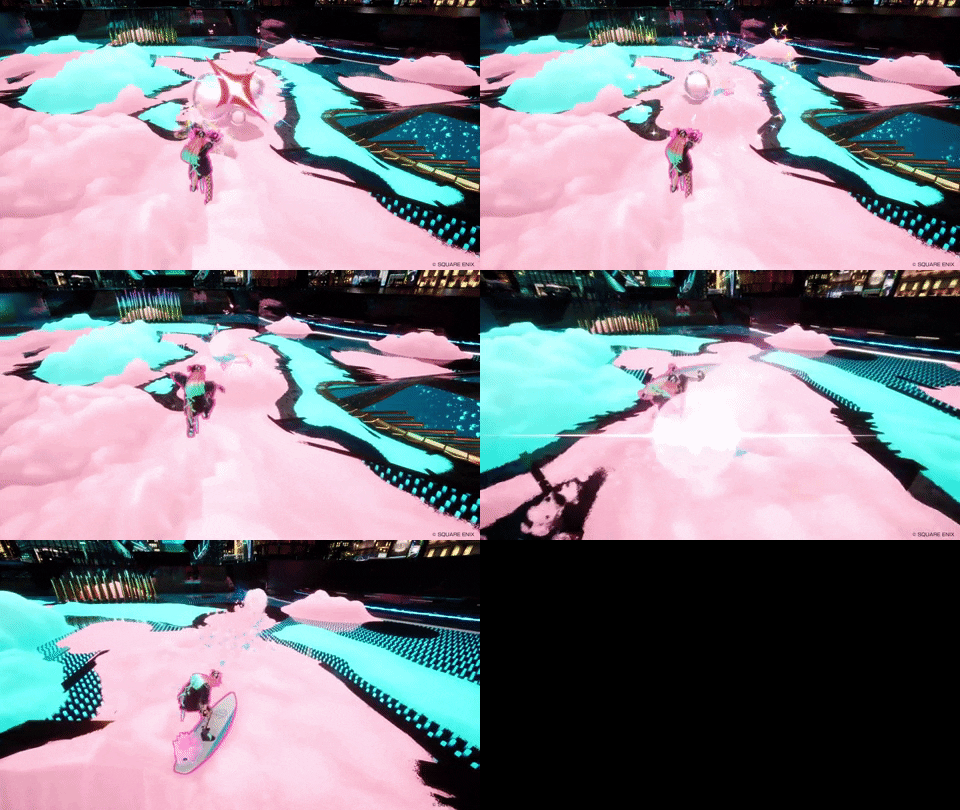
    Slide into enemies to take them out

    Remember that foaming your enemies isn’t enough. Once a player is foamed up, you (or a teammate) must slide into them to knock them out. You can only slide quickly on your own team’s foam – your opponent’s will slow you down – so try to create roads and paths to ensure you have a route to your target.
    Protect your teammates

    If you see a teammate is foamed up (they’ll be calling for help), sliding into them will free them, thus depriving your opponent a takedown. As satisfying as it is to take down a rival, it’s even more smirk-inducing to undermine their hard work!

    Avoid and replace enemy foam

    If you stand on an opposing team’s foam, your movement will be slowed dramatically. Not only does this make you easy pickings for your rivals, it feels horribly sticky – so you’ll want to avoid it.

    You can either try to avoid enemy foam, or you can fire your own weapon to replace it. Either way, stay on your own bubbles as much as possible.

    Use foam to block enemies and find advantageous angles

    The more foam you spray, the more it will build up. You can create walls and bases made of foam which can be very useful.

    For example, building a wall can block enemy approaches and force them to find alternate routes to their targets, and protect your teammates. Or you can use foam to get up high, giving yourself a wider view of the arena and the opportunity to take out enemies from above.

    Work with your team, and you’ll discover all kinds of awesome ways to use your foam to your advantage…

    Use your skills

    Every character has a set of unique skills, which are activated with the shoulder buttons and a Super Star Skill that can be unleashed with triangle. These can range from foamsplosive grenades to faster traversal methods.

    Skills can be game-changers, and they recharge over time, so don’t feel a need to hold them back. Remember: they exist to be used!


    We hope you enjoy playing Foamstars and remember – the open beta is just a taste of what’s in store in the full game which will release early 2024.

    For now, we can’t wait to see you in Bath Vegas for the Open Beta Party.

    Go to Source (PlayStation.com)

    Post Views: 188
    Americana Bath It's lights metropolis Neon PlayStation Retro sprawling Vegas' Welcome
    Share. Facebook Twitter Pinterest LinkedIn Tumblr Reddit Email
    Previous ArticleGhostrunner 2 demo available for PS5 today – new story trailer revealed
    Next Article Get the New Starfield Vasco Figure at the IGN Store
    Sarah Connor
    • Website

    Related Posts

    Monster Hunter Wilds: New content update and Arch-Tempered Arkveld arrive February 18 

    10 February 2026

    Hearthstone Spotlight Announces the Next Expansion Coming, and More!

    9 February 2026

    Fallout 76 Still Doesn’t Have Crossplay Seven Years Later, But Bethesda’s Not Ruling It Out

    9 February 2026

    Relooted: Heist as Puzzle, Puzzle as Montage

    9 February 2026

    Romeo is a Dead Man – Suda 51 and director Ren Yamazaki discuss controlled chaos of development

    9 February 2026

    Interview: An Inside Look Behind the Chaos of Romeo is A Dead Man

    9 February 2026
    Add A Comment

    Comments are closed.

    Editors Picks

    10 Things I Wish I Knew Before Starting Mewgenics

    10 February 2026

    Magic Not Planning Harry Potter Crossover Despite Parent Company Announcing Major Deal

    10 February 2026

    Pokémon Go Players Kept Swarming The Epstein Island Pokéstop, Forcing Devs To Remove It

    10 February 2026

    Monster Hunter Wilds Teases Expansion And Final Update As It Slowly Recovers On PC

    10 February 2026
    Top Reviews
    Xtreme Servers Blog Ad 3
    About Us
    About Us

    We were founded in 2019 with some key objectives, provide our customers with an easy, reliable, fast and enjoyable gaming experience. Welcome to Xtreme Servers.

    Email Us: info@xtremeservers.com

    Facebook X (Twitter) Instagram YouTube Discord RSS
    Our Picks

    10 Things I Wish I Knew Before Starting Mewgenics

    10 February 2026

    Magic Not Planning Harry Potter Crossover Despite Parent Company Announcing Major Deal

    10 February 2026

    Pokémon Go Players Kept Swarming The Epstein Island Pokéstop, Forcing Devs To Remove It

    10 February 2026

    Subscribe to Updates

    Get the latest news, articles & guides from Xtreme Servers by subscribing to our newsletter.

    © 2026 Xtreme Servers All rights reserved.
    • Home
    • Contact us
    • info@xtremeservers.com

    Type above and press Enter to search. Press Esc to cancel.