

Close Menu

    Subscribe to Updates

    Get the latest creative news from FooBar about art, design and business.

    What's Hot

    Discord Goes Into Damage Control Mode Over New Age Verification Requirements, Promising There’s Nothing To See Here For ‘Vast Majority’ Of Users

    10 February 2026

    Pokémon Fan Spends Half A Decade On The Craziest Shiny Hunt I’ve Ever Seen

    10 February 2026

    The Binding Of Isaac Dev’s New Game Takes 500 Hours To Complete And Will Take Players ‘Months or Years’ To Find All Of Its Secrets

    10 February 2026
    Facebook X (Twitter) YouTube Discord RSS
    Wednesday, February 11
    • Contact us
    • info@xtremeservers.com
    Facebook X (Twitter) YouTube Discord Instagram Pinterest RSS
    Xtreme Servers
    Xtreme Servers Blog Ad 1
    • Home
    • Game Servers
      • ARK: Survival Evolved
      • Counter Strike GO
      • Gary’s MOD
      • Minecraft
      • Rust
      • Team Fortress 2
    • Servers
      • VPS Hosting
    • Categories
      1. PlayStation
      2. PC
      3. Nintendo
      4. Xbox
      5. View All

      Monster Hunter Wilds: New content update and Arch-Tempered Arkveld arrive February 18 

      10 February 2026

      Fallout 76 Still Doesn’t Have Crossplay Seven Years Later, But Bethesda’s Not Ruling It Out

      9 February 2026

      Romeo is a Dead Man – Suda 51 and director Ren Yamazaki discuss controlled chaos of development

      9 February 2026

      State of Play returns this Thursday, February 12

      9 February 2026

      Discord Goes Into Damage Control Mode Over New Age Verification Requirements, Promising There’s Nothing To See Here For ‘Vast Majority’ Of Users

      10 February 2026

      Pokémon Fan Spends Half A Decade On The Craziest Shiny Hunt I’ve Ever Seen

      10 February 2026

      The Binding Of Isaac Dev’s New Game Takes 500 Hours To Complete And Will Take Players ‘Months or Years’ To Find All Of Its Secrets

      10 February 2026

      Arc Raiders Item Duplication Epidemic Gets An Emergency Fix

      10 February 2026

      Today’s Nintendo Direct Was A Damning Display Of The State Of Switch 2

      5 February 2026

      The Elder Scrolls IV: Oblivion Remastered Is Coming To Switch 2…Eventually

      5 February 2026

      Everything We Saw At Today’s Nintendo Partner Direct

      5 February 2026

      Amazon Clears Out the Original Nintendo Switch With Joy-Con Controllers at a Record Low

      5 February 2026

      All Signs Point To A Resident Evil 5 Remake After New ESRB Listing

      10 February 2026

      Hearthstone Spotlight Announces the Next Expansion Coming, and More!

      9 February 2026

      Fallout 76 Still Doesn’t Have Crossplay Seven Years Later, But Bethesda’s Not Ruling It Out

      9 February 2026

      Relooted: Heist as Puzzle, Puzzle as Montage

      9 February 2026

      Discord Goes Into Damage Control Mode Over New Age Verification Requirements, Promising There’s Nothing To See Here For ‘Vast Majority’ Of Users

      10 February 2026

      Pokémon Fan Spends Half A Decade On The Craziest Shiny Hunt I’ve Ever Seen

      10 February 2026

      The Binding Of Isaac Dev’s New Game Takes 500 Hours To Complete And Will Take Players ‘Months or Years’ To Find All Of Its Secrets

      10 February 2026

      Arc Raiders Item Duplication Epidemic Gets An Emergency Fix

      10 February 2026
    • Contact
    Xtreme Servers
    Home » How to Buy a Digital Game as a Gift This Holiday
    Featured

    How to Buy a Digital Game as a Gift This Holiday

    Sarah ConnorBy Sarah Connor5 December 2025No Comments4 Mins Read
    Facebook Twitter Pinterest Reddit LinkedIn Tumblr Email
    Share
    Facebook Twitter Pinterest Reddit Email
    • Category: Games

    December 5, 2025

    How to Buy a Digital Game as a Gift This Holiday

    • Joe Skrebels (Xbox Wire Editor-in-Chief) and Albert Dankwa (Xbox Content Program Manager II, Social Lead)

    If you want to give a game to a friend or family member this holiday season, gifting a digital game is a great and convenient option. With the Microsoft Store on Xbox, Microsoft Store on Windows, Xbox on PC (including Xbox ROG Ally handhelds), or the Microsoft Store online experience, it’s never been easier to send someone a near-instantaneous gift on Xbox or PC. 

    To see how easy it is to gift a game on console, you can watch our tutorial video below, or read on for a step-by-step guide. 

    Gifting Through Console

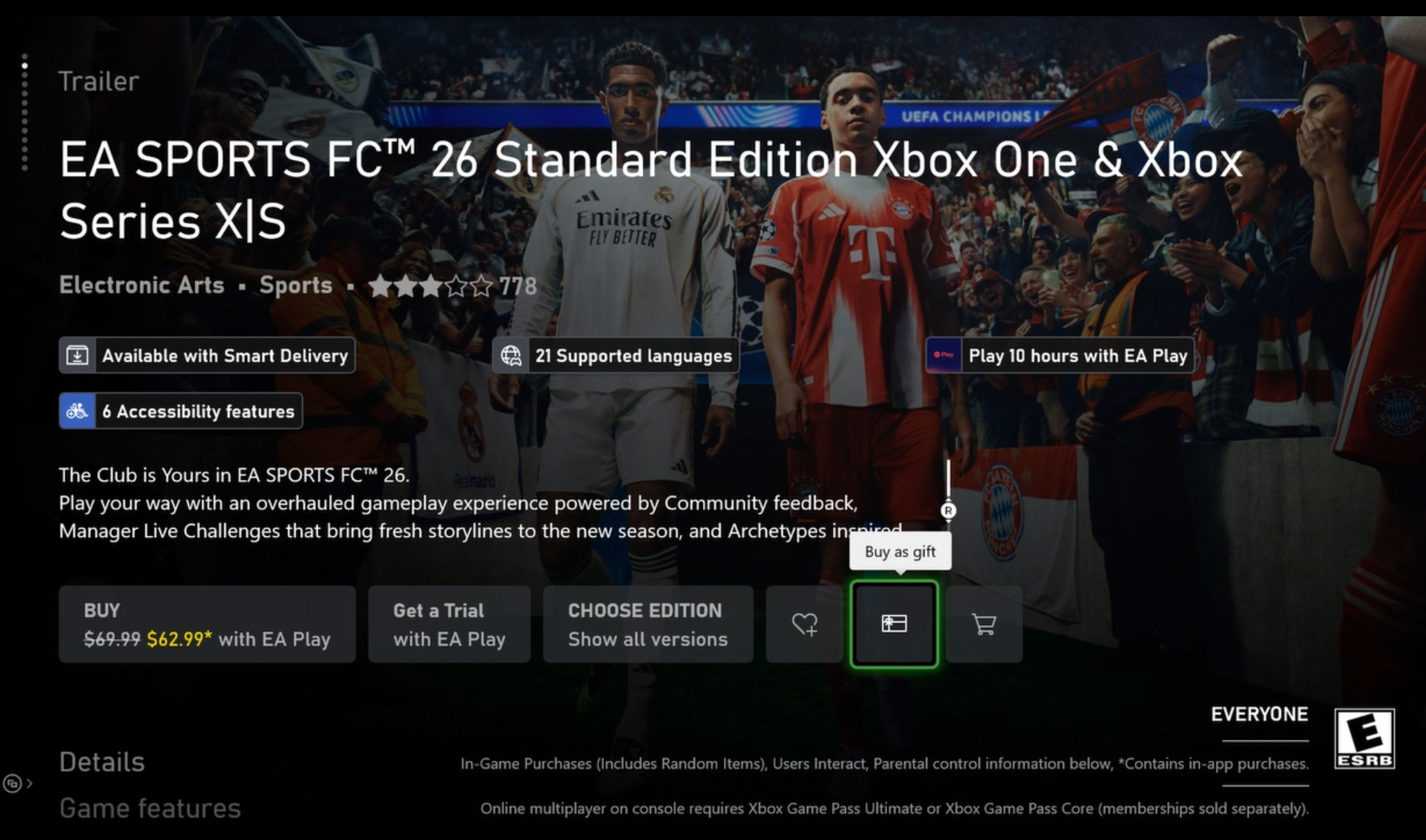
    • To send a digital game as a gift on your console just go to the Microsoft Store, find the game you’d like to gift, locate the gift wrap icon, and click on it.
    Digital Game Gifting - Console Image 1
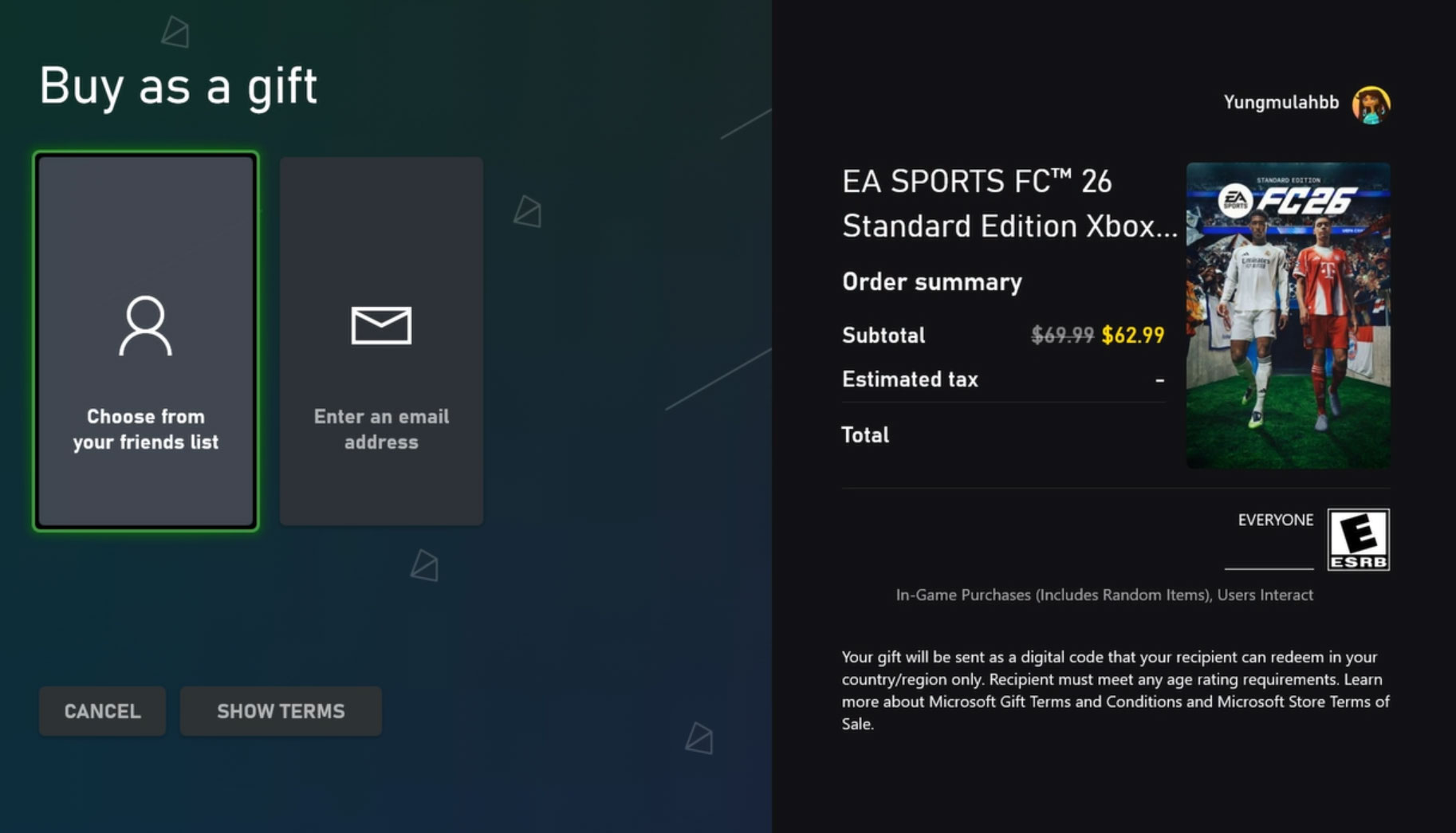
    • This will open the “Buy as gift” options, where you can either choose someone from your friends list or type in an email. Note: Make sure the person receiving the gift is in the same country as you.
    Digital Game Gifting - Console Image 2
    • From here, just choose your payment option and buy as a gift.
    • Your friend will receive a message both on their Xbox console and the email associated with their Xbox account. From there they only need to click on “Redeem code” and they are ready to play!
    • You can also send add-ons and subscriptions as gifts, such as Xbox Game Pass Ultimate!

    Gifting Through the Xbox App on PC (Including ROG Xbox Ally)
    Digital Game Gifting - Xbox on PC

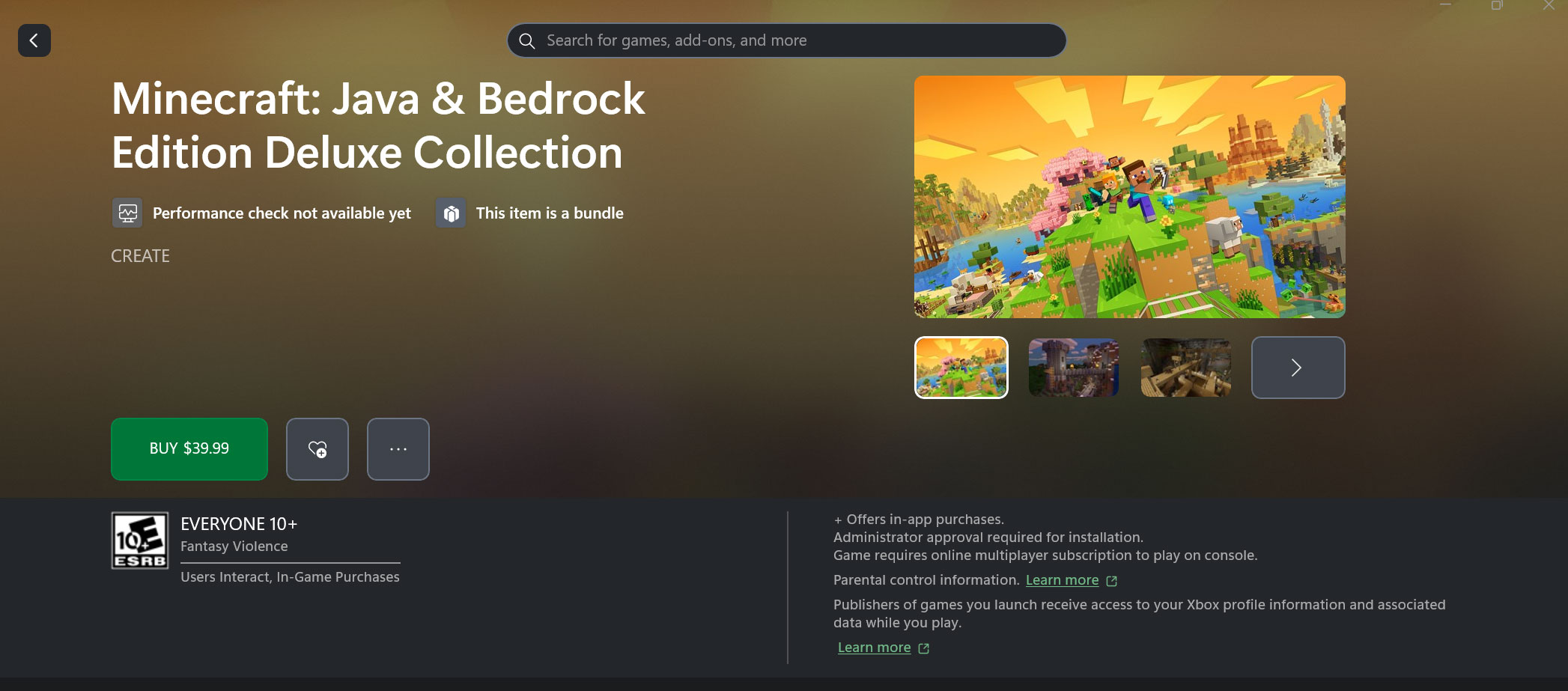
    This is the same process as buying a gift on console – simply search for the game you want to send, then hit the “…” button and pick “Buy as Gift” in the dropdown menu. You can choose to send this to an Xbox friend or send to an email address. 

    If you’re using a ROG Xbox Ally handheld, this process is identical when using the Store tab in the Xbox Full Screen Experience. 

    Gifting Through Web Browser
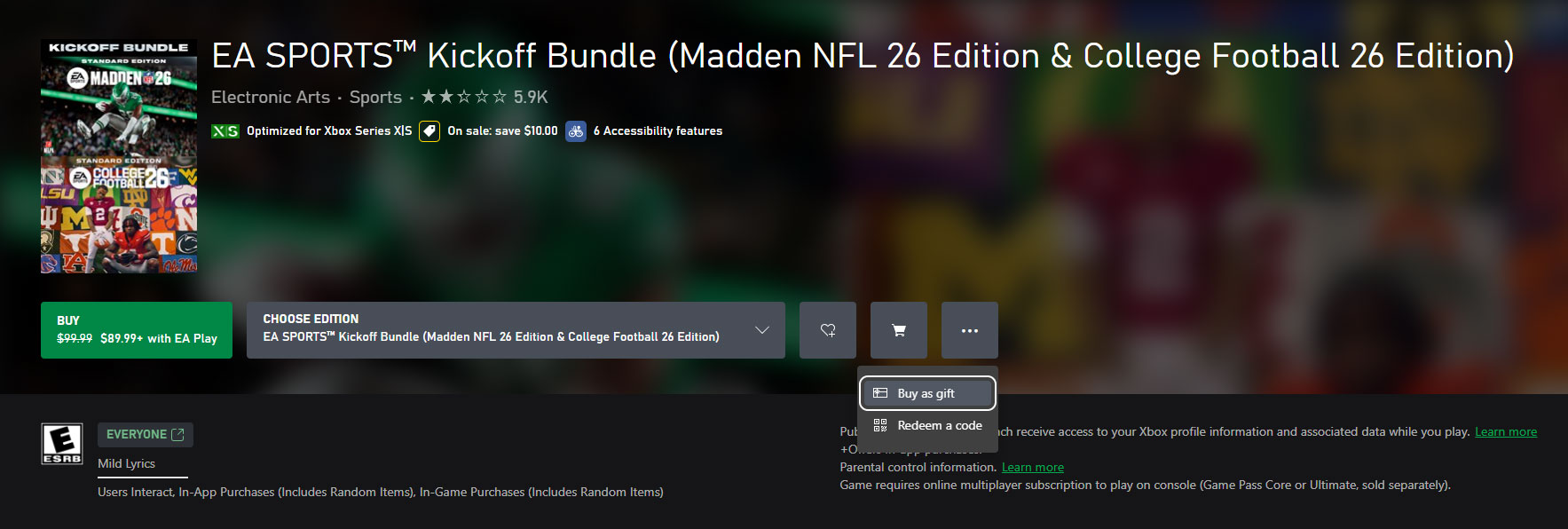
    Digital Game Gifting - Web Browser

    On the web your experience will be quite similar, though you will only have the email option. Visit the Microsoft Store Online, find the game, add-on, or subscription you wish to send as a gift and click on “Buy as a gift,” in the “…” dropdown menu beside the buy button, be it on your desktop or mobile device. After you log in to your Microsoft Account, choose your payment method, and you are ready to go. 

    Gifting Through the Microsoft Store on Windows
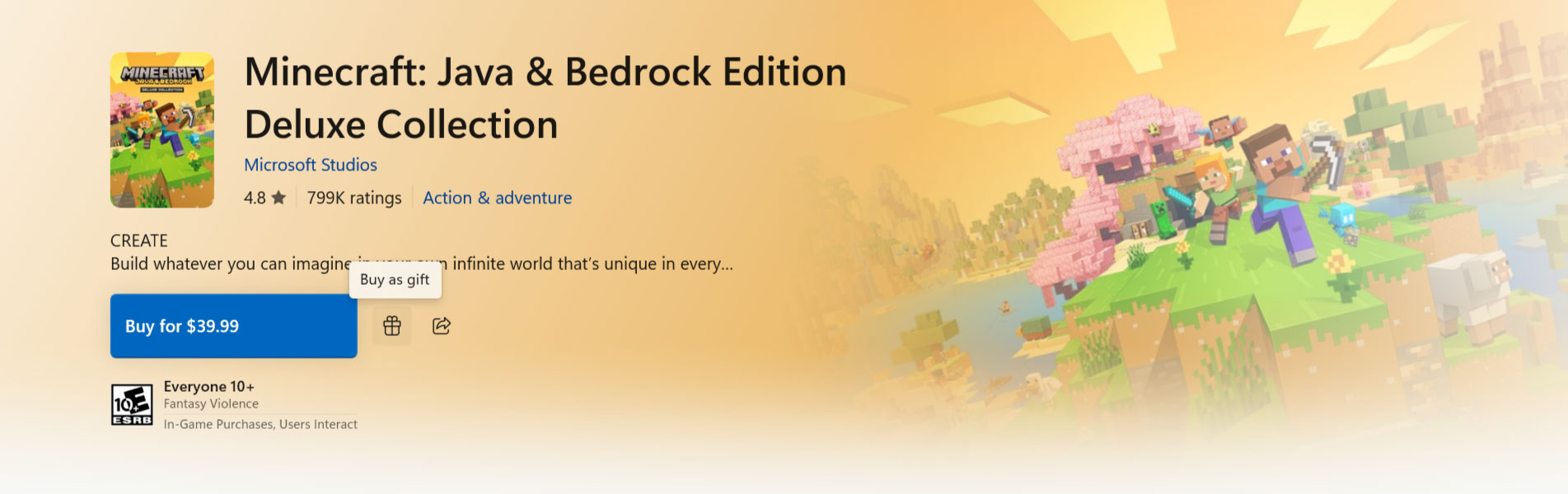
    Digital Game Gifting - Microsoft Store on Windows

    On the Microsoft Store on Windows experience, you will only have the email option. Visit the Microsoft Store on Windows, find the game, add-on, or subscription you wish to send as a gift and click on “Buy as a Gift”, icon to the right of the buy button. After you log in to your Microsoft Account, choose your payment method, and you are ready to go. 

    For all the details on gifting digital games, visit our support page.  

    This article has been updated for 2025. The original version of the article was written by Daniel Martins.

    Related Stories for “How to Buy a Digital Game as a Gift This Holiday”

    Thank Goodness You're Here!

    • Category: Next Week on Xbox

    Next Week on Xbox: New Games for December 8 to 12

    Free Play Days 12/4/2025 Hero Image

    • Category: Games

    Free Play Days – Bassmaster Fishing, Destiny 2, Everspace 2, Descenders, Astria Ascending and Way of the Hunter

    Routine

    • Category: Games

    Crafting a Relatable Sci-Fi Horror World in Routine, Out Today on Xbox

    The post How to Buy a Digital Game as a Gift This Holiday appeared first on Xbox Wire.

    Go to Source (xbox.com)

    Post Views: 67
    2025 How category digital Game GamesDecember Gift Holiday Joe pc Skrebels Wire Xbox
    Share. Facebook Twitter Pinterest LinkedIn Tumblr Reddit Email
    Previous ArticleGovee Liquidates TV Backlight for More Immersive Movies, Now Selling at Record Low on Amazon
    Next Article LEGO Holds Star Wars Jango Fett’s Starship at Its Black Friday Low to Move Holiday Stock
    Sarah Connor
    • Website

    Related Posts

    Monster Hunter Wilds Teases Expansion And Final Update As It Slowly Recovers On PC

    10 February 2026

    All Signs Point To A Resident Evil 5 Remake After New ESRB Listing

    10 February 2026

    Mewgenics Is A Brilliantly Gross Antidote To Boring Roguelites

    9 February 2026

    Trading Card Games Are Booming, So Here’s Why Blizzard Isn’t Making Hearthstone Cards (Yet)

    9 February 2026

    Hearthstone Spotlight Announces the Next Expansion Coming, and More!

    9 February 2026

    Fallout 76 Still Doesn’t Have Crossplay Seven Years Later, But Bethesda’s Not Ruling It Out

    9 February 2026
    Add A Comment

    Comments are closed.

    Editors Picks

    Discord Goes Into Damage Control Mode Over New Age Verification Requirements, Promising There’s Nothing To See Here For ‘Vast Majority’ Of Users

    10 February 2026

    Pokémon Fan Spends Half A Decade On The Craziest Shiny Hunt I’ve Ever Seen

    10 February 2026

    The Binding Of Isaac Dev’s New Game Takes 500 Hours To Complete And Will Take Players ‘Months or Years’ To Find All Of Its Secrets

    10 February 2026

    Arc Raiders Item Duplication Epidemic Gets An Emergency Fix

    10 February 2026
    Top Reviews
    Xtreme Servers Blog Ad 3
    About Us
    About Us

    We were founded in 2019 with some key objectives, provide our customers with an easy, reliable, fast and enjoyable gaming experience. Welcome to Xtreme Servers.

    Email Us: info@xtremeservers.com

    Facebook X (Twitter) Instagram YouTube Discord RSS
    Our Picks

    Discord Goes Into Damage Control Mode Over New Age Verification Requirements, Promising There’s Nothing To See Here For ‘Vast Majority’ Of Users

    10 February 2026

    Pokémon Fan Spends Half A Decade On The Craziest Shiny Hunt I’ve Ever Seen

    10 February 2026

    The Binding Of Isaac Dev’s New Game Takes 500 Hours To Complete And Will Take Players ‘Months or Years’ To Find All Of Its Secrets

    10 February 2026

    Subscribe to Updates

    Get the latest news, articles & guides from Xtreme Servers by subscribing to our newsletter.

    © 2026 Xtreme Servers All rights reserved.
    • Home
    • Contact us
    • info@xtremeservers.com

    Type above and press Enter to search. Press Esc to cancel.