Close Menu

    Subscribe to Updates

    Get the latest creative news from FooBar about art, design and business.

    What's Hot

    How to Catch Super Bowl LX in the US? Patriots vs Seahawks Free Streams

    8 February 2026

    Stream Super Bowl 2026 in Canada: How to Watch the Show Today

    8 February 2026

    Super Bowl LX 2026: How to Watch and What to Know About Sunday’s Broadcast

    7 February 2026
    Facebook X (Twitter) YouTube Discord RSS
    Monday, February 9
    • Contact us
    • info@xtremeservers.com
    Facebook X (Twitter) YouTube Discord Instagram Pinterest RSS
    Xtreme Servers
    Xtreme Servers Blog Ad 1
    • Home
    • Game Servers
      • ARK: Survival Evolved
      • Counter Strike GO
      • Gary’s MOD
      • Minecraft
      • Rust
      • Team Fortress 2
    • Servers
      • VPS Hosting
    • Categories
      1. PlayStation
      2. PC
      3. Nintendo
      4. Xbox
      5. View All

      Official PlayStation Podcast Episode 533: John Carpentry 101

      6 February 2026

      Share of the Week: Rustic

      6 February 2026

      Honkai: Star Rail Version 4.0 No Aha at Full Moon will go live on February 13

      6 February 2026

      Starfield‘s PS5 Release Date Might Have Just Leaked And It’s Not Far Away

      5 February 2026

      How to Catch Super Bowl LX in the US? Patriots vs Seahawks Free Streams

      8 February 2026

      Stream Super Bowl 2026 in Canada: How to Watch the Show Today

      8 February 2026

      Super Bowl LX 2026: How to Watch and What to Know About Sunday’s Broadcast

      7 February 2026

      Apple iPad (A16 Chip) Sees Another Drop, Catch a Falling Star at a Record Low Near AirPods Pro Pricing

      7 February 2026

      Today’s Nintendo Direct Was A Damning Display Of The State Of Switch 2

      5 February 2026

      The Elder Scrolls IV: Oblivion Remastered Is Coming To Switch 2…Eventually

      5 February 2026

      Everything We Saw At Today’s Nintendo Partner Direct

      5 February 2026

      Amazon Clears Out the Original Nintendo Switch With Joy-Con Controllers at a Record Low

      5 February 2026

      Next Week on Xbox: New Games for February 9 to 13

      6 February 2026

      Experience FragPunk’s Paint-Splattered Future in the Pigment Realm

      5 February 2026

      Free Play Days – 2K Takeover 2026

      5 February 2026

      Final Fantasy VII Rebirth Comes to Xbox June 3 – Pre-Order Now

      5 February 2026

      How to Catch Super Bowl LX in the US? Patriots vs Seahawks Free Streams

      8 February 2026

      Stream Super Bowl 2026 in Canada: How to Watch the Show Today

      8 February 2026

      Super Bowl LX 2026: How to Watch and What to Know About Sunday’s Broadcast

      7 February 2026

      Apple iPad (A16 Chip) Sees Another Drop, Catch a Falling Star at a Record Low Near AirPods Pro Pricing

      7 February 2026
    • Contact
    Xtreme Servers
    Home » Introducing Community Game Help, a new enhancement for Game Help powered by user-generated content
    PlayStation

    Introducing Community Game Help, a new enhancement for Game Help powered by user-generated content

    Sarah ConnorBy Sarah Connor26 March 2024No Comments5 Mins Read
    Facebook Twitter Pinterest Reddit LinkedIn Tumblr Email
    Share
    Facebook Twitter Pinterest Reddit Email

    When the PlayStation 5 console launched in 2020, we introduced Game Help to enable players to easily access hints, tips, or walkthrough videos without leaving the game to help them progress through a level, obtain a trophy, or find a coveted hidden item.

    We’re always evolving the PS5 console experience, and today, we are happy to announce a new enhancement for Game Help launching later this year: Community Game Help. Community Game Help will add to the current Game Help experience by expanding the library of helpful game hints, incorporating videos that are automatically generated from gameplay footage of players who have opted in to contribute.

    When the enhanced Game Help experience featuring content from the community launches, Game Help will be available to all PS5 players, with or without a PlayStation Plus subscription. In supported games, PS5 players will be able to contribute their gameplay, view hints from fellow gamers, or access Game Help hints created by developers. Game developers can also continue to create their own hint videos, as seen in popular titles available today like The Last of Us Part II Remastered and Marvel’s Spider-Man 2.

    Let’s take a deeper look at how Community Game Help will work. 

    How to access Community Game Help

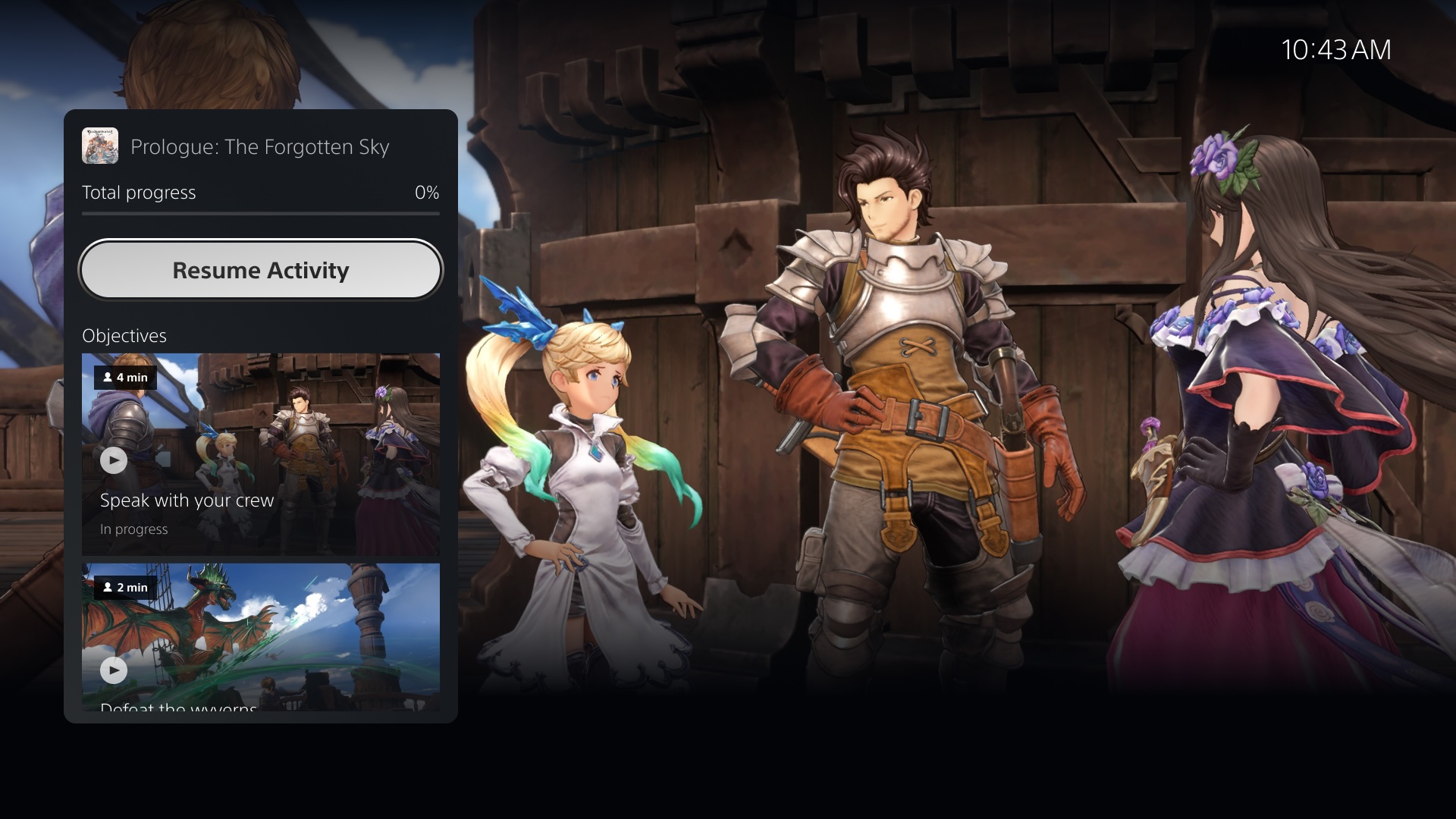
    If you are already familiar with the current Game Help experience, Community Game Help will be largely similar. If you find yourself in a tricky situation and need help, press the PS button to open the Control Center and look for an Action Card with the “Hints inside” icon.

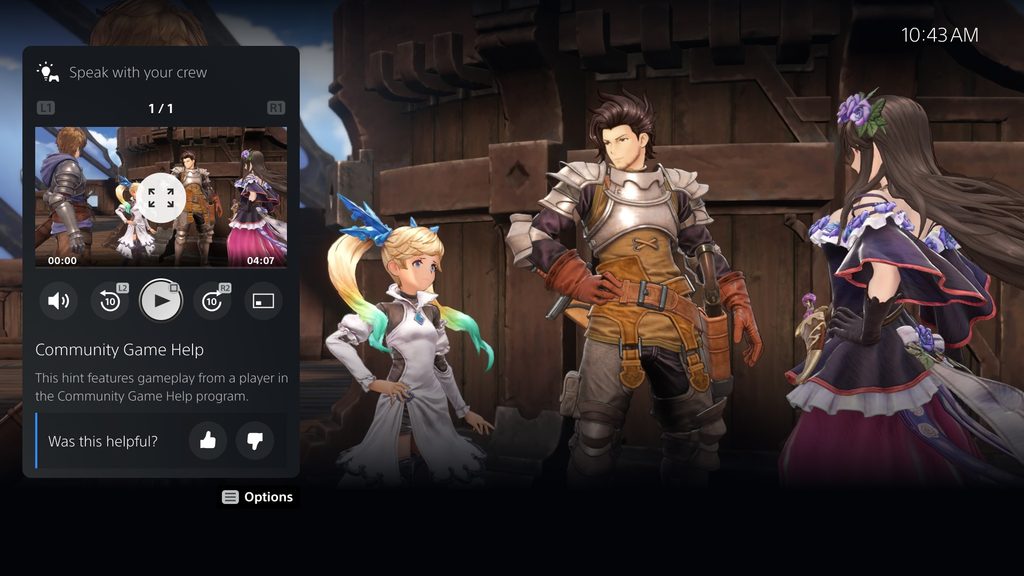
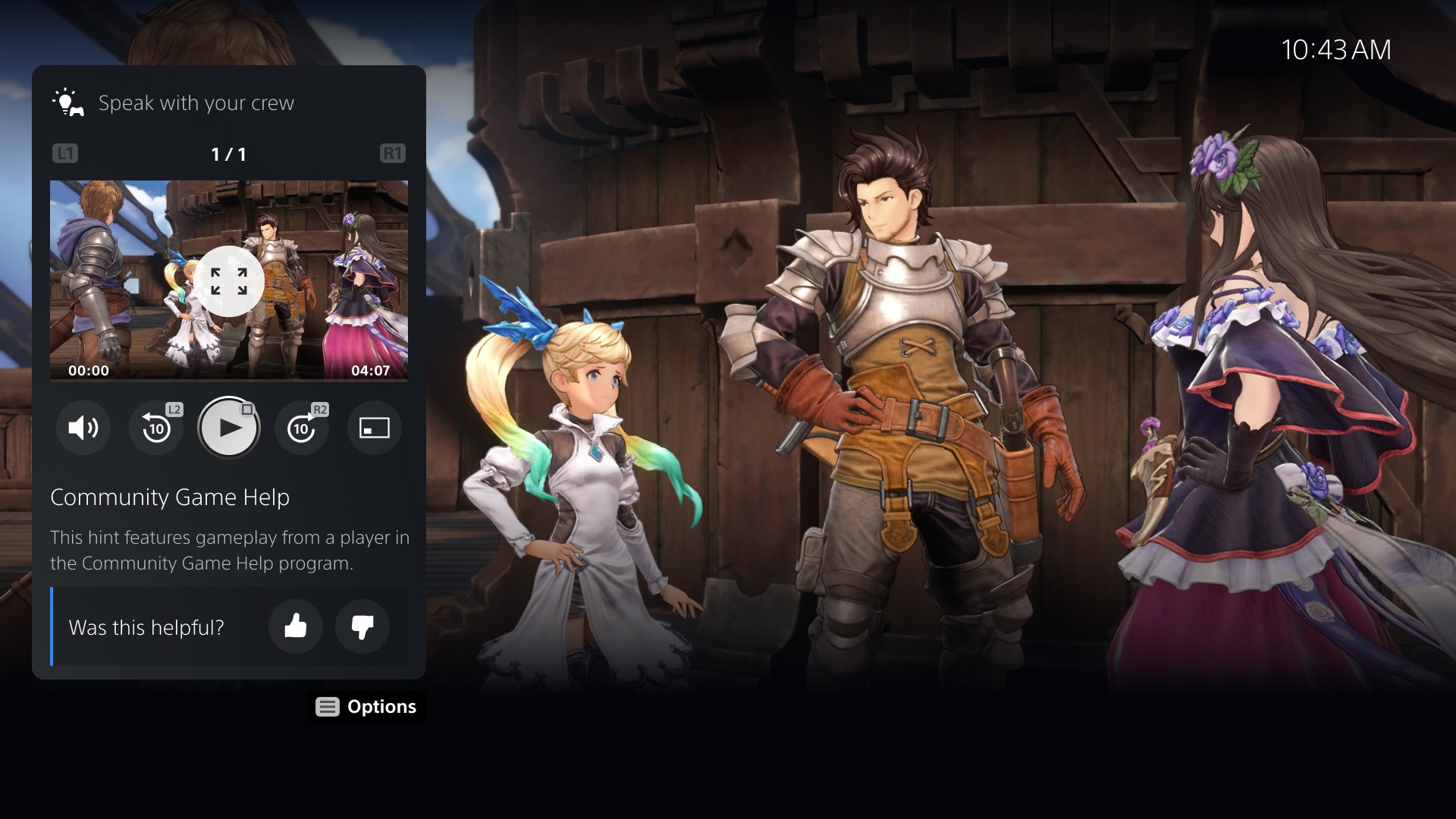
    In addition to the developer-generated hints that are currently provided in supported games, you will eventually start to see hints labeled “Community Game Help”, which indicates that the clip was generated from other players’ gameplay footage. You can also rate the usefulness of these hints, which will allow us to curate informative help content for players.
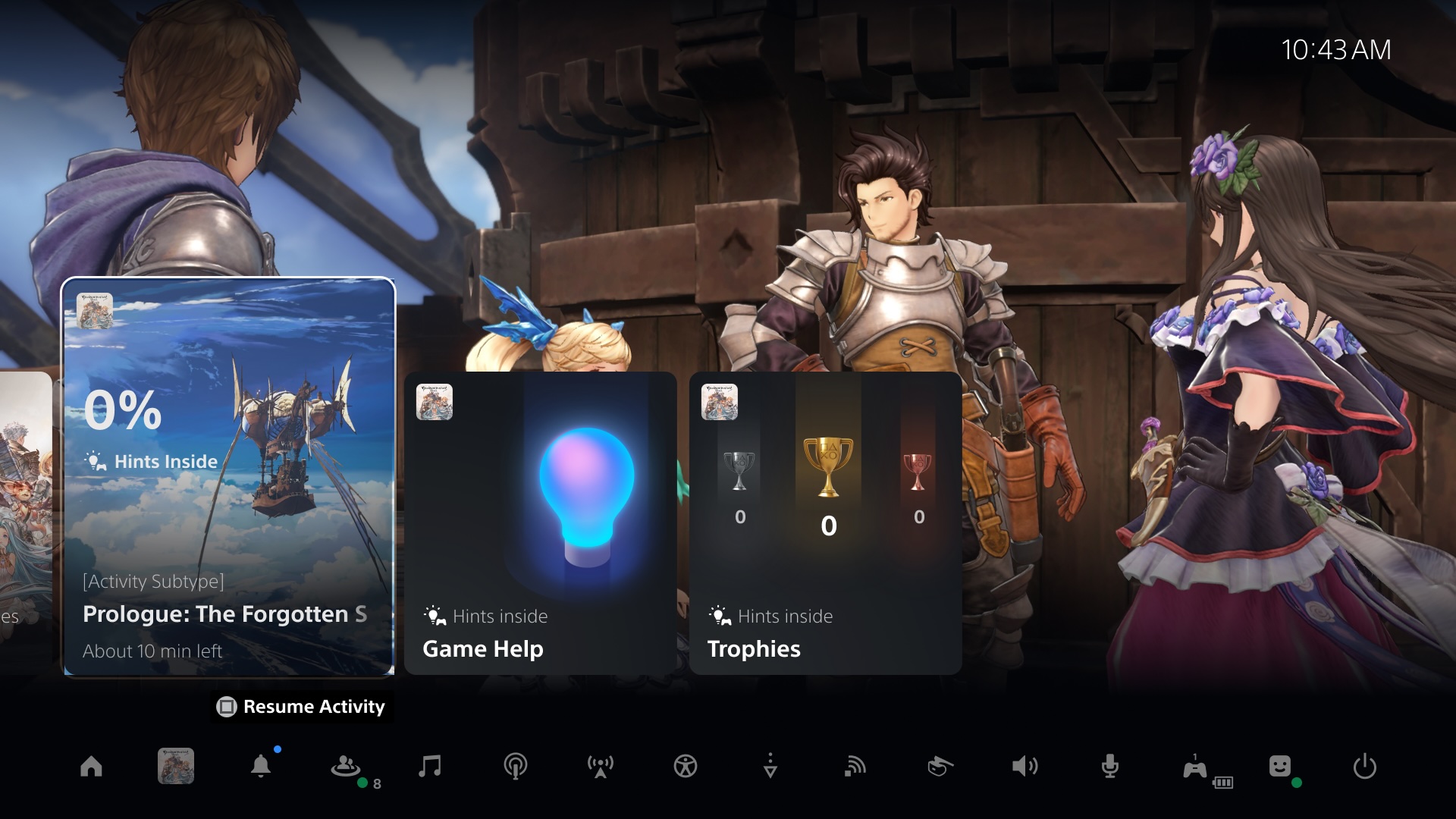
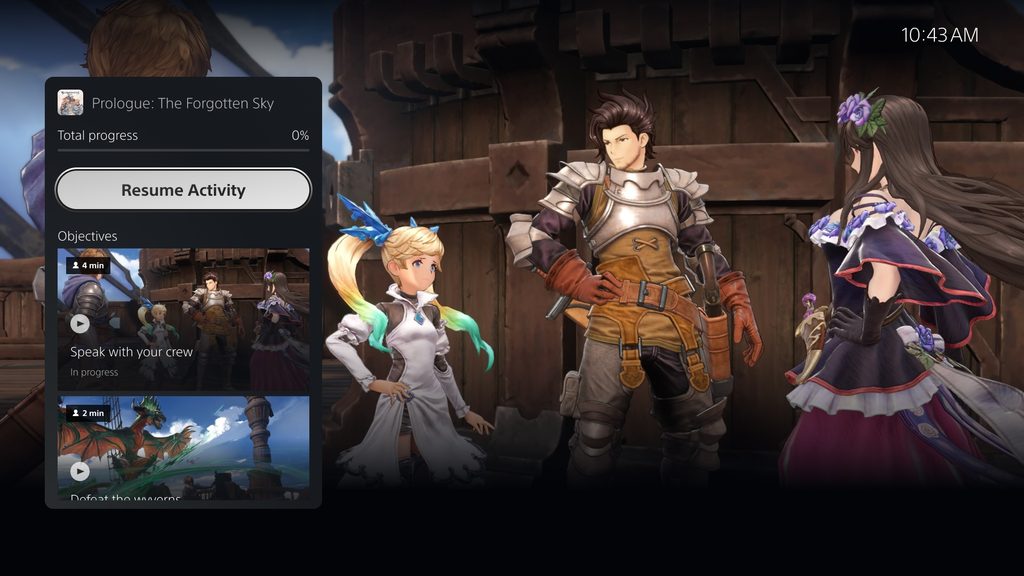
    Download “PS5 UI screenshot showing Community Game Help for Granblue Fantasy: Relink”

     "PS5 UI screenshot showing Community Game Help for Granblue Fantasy: Relink"


    Download this image

    PS5 UI screenshot showing Community Game Help for Granblue Fantasy: Relink

    Download “PS5 UI screenshot showing Community Game Help for Granblue Fantasy: Relink”

     "PS5 UI screenshot showing Community Game Help for Granblue Fantasy: Relink"


    Download this image

    PS5 UI screenshot showing Community Game Help for Granblue Fantasy: Relink

    Download “PS5 UI screenshot showing Community Game Help for Granblue Fantasy: Relink”

     "PS5 UI screenshot showing Community Game Help for Granblue Fantasy: Relink"


    Download this image

    Game Help is currently available on PlayStation App, so you can also use your mobile device to access these hints without taking space on your game screen. 
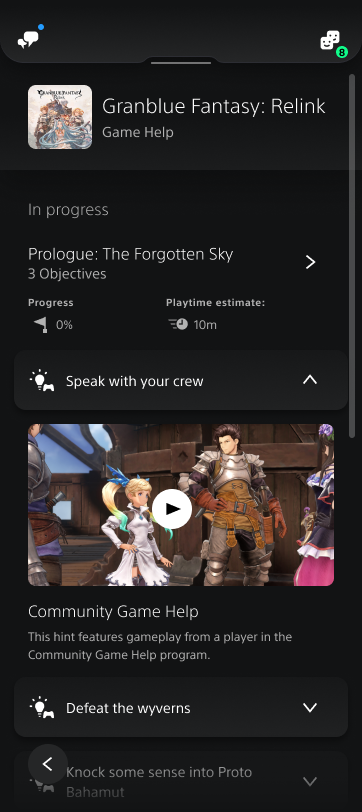
    PlayStation App screenshot showing Community Game Help for Granblue Fantasy: Relink

     How to contribute to Community Game Help

    If you enjoy sharing your gaming expertise with others and are willing to contribute to Community Game Help, you can participate by opting in from the Settings menu.* You can also opt out any time, which will remove all of your published videos from Community Game Help. These settings will become available within the next few months, so please stay tuned for more information.

    • Go to [Captures & Broadcasts] >[Captures] > [Auto Captures] > [Community Game Help], then select [Participate] to opt in to the program.
    • You can also select the monthly capture limit to control how many videos you will allow to be captured from your gameplay per month.
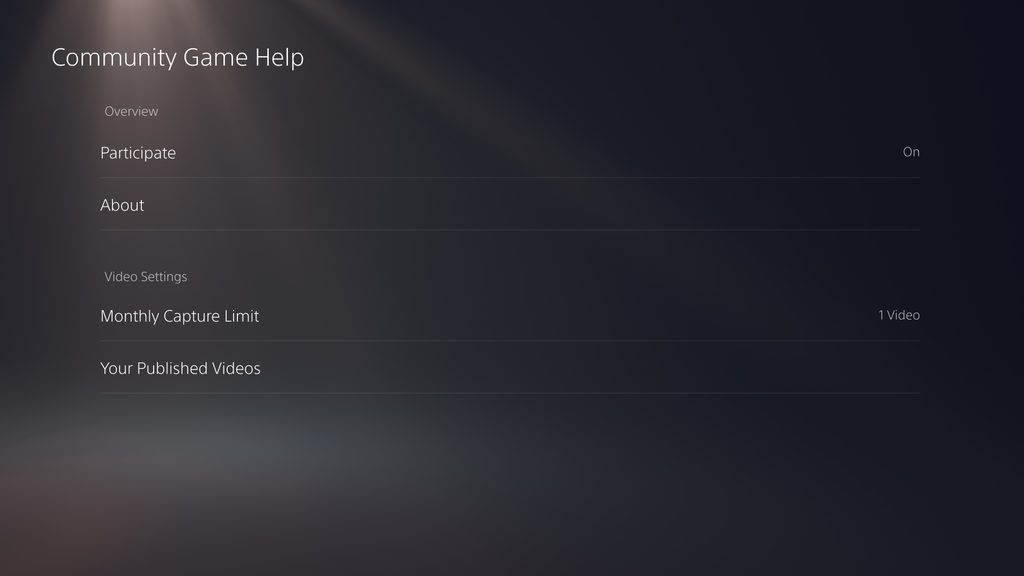
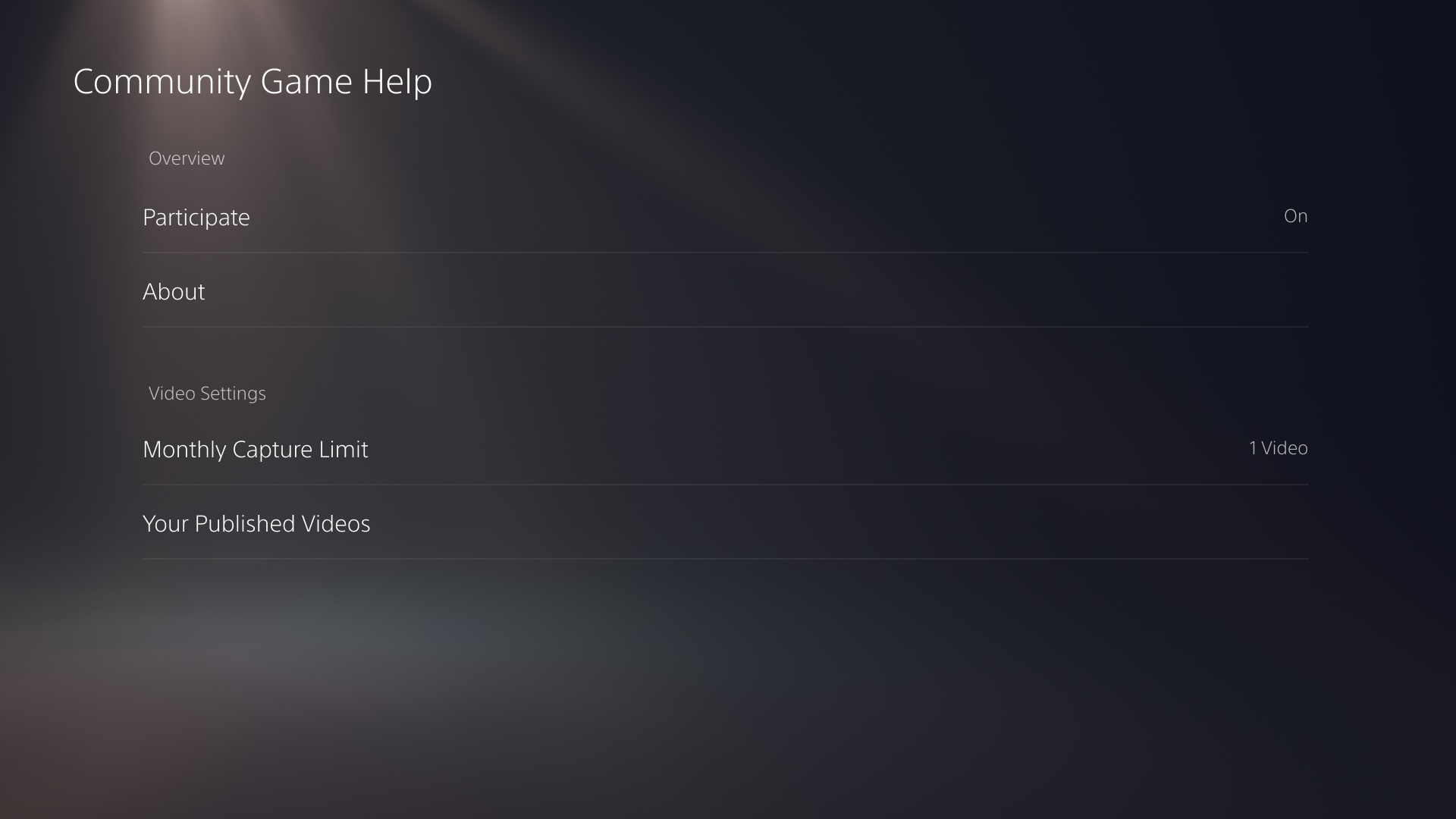
    Download the image


    Download this image

    Once you turn on the settings, your PS5 will automatically capture a video when you complete a certain activity in a game. Then, it will be reviewed by a moderator, and if approved, your video will be published as a Game Help hint for PlayStation players to watch, learn from, and rate. Your videos will be removed from the PS5 console once they are uploaded to our servers, so it will not impact your console storage.

    When your video is published, you will receive a system notification on your PS5 console. 
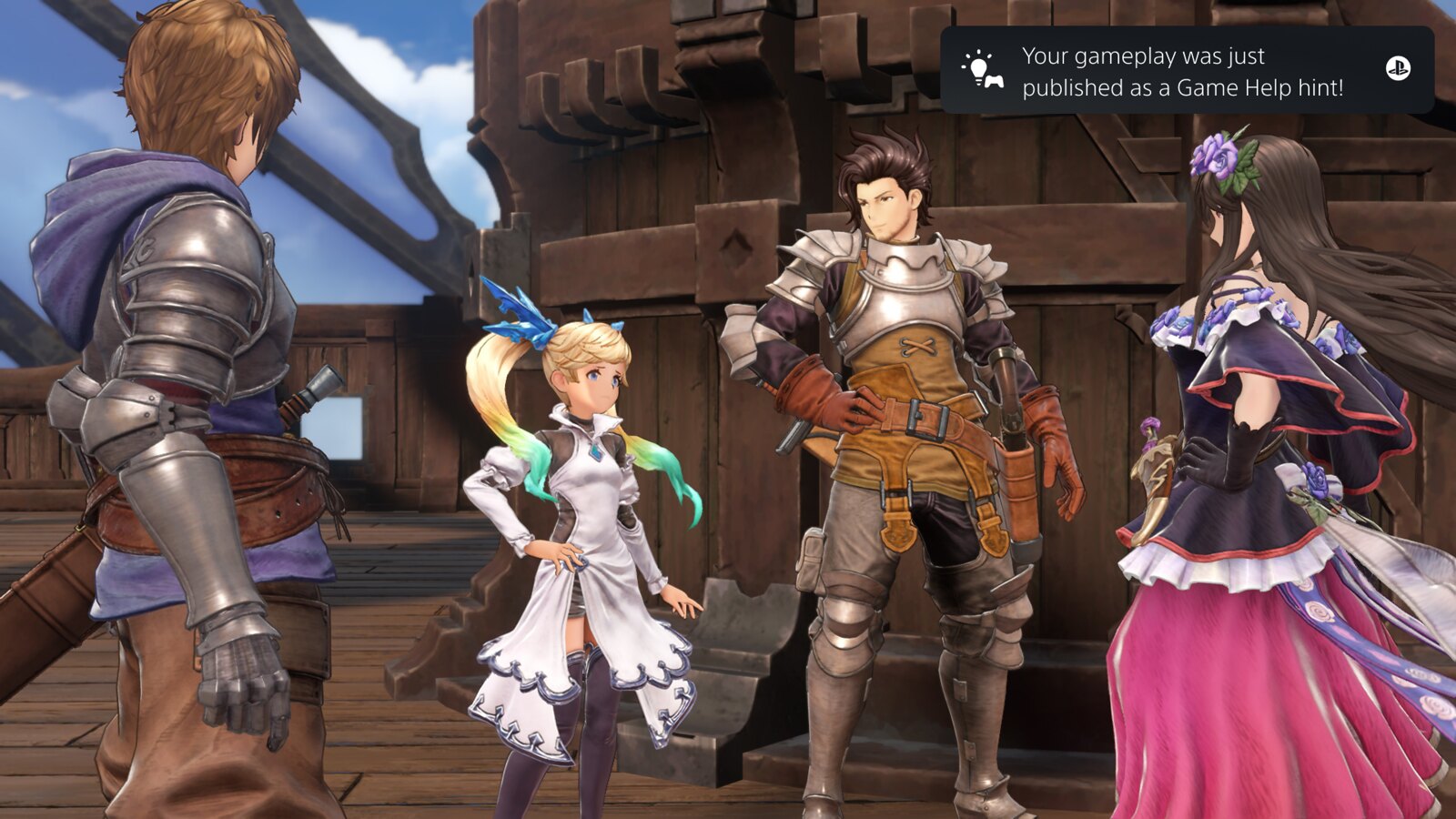
    PS5 UI screenshot showing a system notification stating ‘Your gameplay was just published as a Game Help hint’

    This process will be done automatically, so you don’t need to edit or upload your clips for submission. Only your raw game footage will be uploaded, so images and audio from your webcam, microphone, or party chat audio will not be shared with the moderator or the community. Depending on the game you’re playing, your video may include online IDs or chat messages that are shown on your game screen.

    You can check your published videos from the settings menu and remove them at any time.

    PS5 UI screenshot showing three Granblue Fantasy: Relink videos under the headline that says ‘Your Published Videos’

    Community Game Help will start to become available in select games later this year, and our goal is to expand it to as many titles as possible in the future.

    Thank you to everyone for helping us improve gaming experiences for the PlayStation community. Please stay tuned for more details as we get closer to the launch.

    We hope to see many players participate in Community Game Help and share their amazing gameplay feats!

    *Contributing to Community Game Help is limited to adult accounts.

    Go to Source (PlayStation.com)

    Post Views: 180
    2020 console enable Game help introduced launched players PlayStation when
    Share. Facebook Twitter Pinterest LinkedIn Tumblr Reddit Email
    Previous ArticleBest Gaming Keyboards 2024: These Keyboards Will Bring You Victory
    Next Article Activision Threatens to Ban Call of Duty Warzone Players Using Boosting Services
    Sarah Connor
    • Website

    Related Posts

    Official PlayStation Podcast Episode 533: John Carpentry 101

    6 February 2026

    Here’s Our First Glimpse Of Sophie Turner As Lara Croft In Action

    6 February 2026

    Share of the Week: Rustic

    6 February 2026

    Next Week on Xbox: New Games for February 9 to 13

    6 February 2026

    Is Hideo Kojima Okay?

    6 February 2026

    Roblox Advertises AI Tools That Immediately Rip Off Clair Obscur: Expedition 33

    6 February 2026
    Add A Comment

    Comments are closed.

    Editors Picks

    How to Catch Super Bowl LX in the US? Patriots vs Seahawks Free Streams

    8 February 2026

    Stream Super Bowl 2026 in Canada: How to Watch the Show Today

    8 February 2026

    Super Bowl LX 2026: How to Watch and What to Know About Sunday’s Broadcast

    7 February 2026

    Apple iPad (A16 Chip) Sees Another Drop, Catch a Falling Star at a Record Low Near AirPods Pro Pricing

    7 February 2026
    Top Reviews
    Xtreme Servers Blog Ad 3
    About Us
    About Us

    We were founded in 2019 with some key objectives, provide our customers with an easy, reliable, fast and enjoyable gaming experience. Welcome to Xtreme Servers.

    Email Us: info@xtremeservers.com

    Facebook X (Twitter) Instagram YouTube Discord RSS
    Our Picks

    How to Catch Super Bowl LX in the US? Patriots vs Seahawks Free Streams

    8 February 2026

    Stream Super Bowl 2026 in Canada: How to Watch the Show Today

    8 February 2026

    Super Bowl LX 2026: How to Watch and What to Know About Sunday’s Broadcast

    7 February 2026

    Subscribe to Updates

    Get the latest news, articles & guides from Xtreme Servers by subscribing to our newsletter.

    © 2026 Xtreme Servers All rights reserved.
    • Home
    • Contact us
    • info@xtremeservers.com

    Type above and press Enter to search. Press Esc to cancel.